Contact center

Resolve it in one conversation, on any channel.

Every call, chat, text, email, and video about one issue lands on one task and goes to the right person. The customer explains it once.

100+ countries · Cloud, hybrid, or onsite · 1 to 1,000 seats

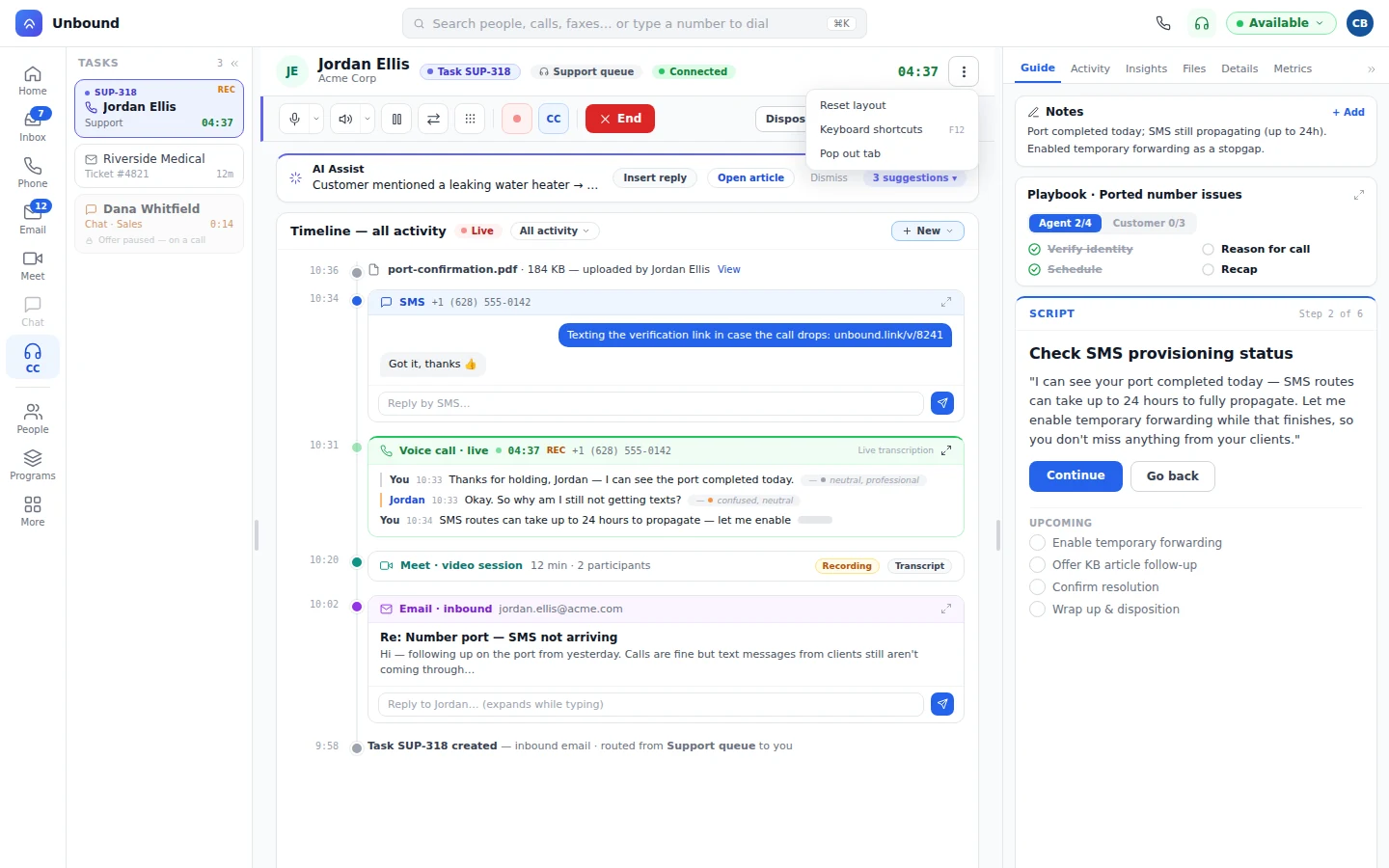
One task timeline with a text thread, a live call, a video session, and an email
A text sent during the call, the live call transcribed, and the video session all sit together, along with the email that opened the task.
Why teams switch

Stop paying for the glue between four tools.

Before

  • A phone system, a chat tool, a ticket desk, and a CRM, stitched together.
  • Each tool keeps its own queue and its own history.
  • The customer repeats the problem every time the channel changes.

On Unbound

  • The queue, the conversation, and the customer record are one system.
  • People and bots take work from the same queues, under one set of routing rules.
  • A call, a text, and an email about one issue share one task and one history.
Omnichannel

Start on a call. Add a text. Move to video. One task.

Every step lands on the same task, so the next person reads one history instead of three. Your managers set how much an agent can hold on each channel type. Most teams let a live call block everything else and let chats, texts, and emails stack. That is your rule, not ours.

  1. The customer calls.

    Their record opens with the task, past conversations and all.

  2. The agent adds a text.

    SMS joins the task, and the customer sends a photo.

  3. The call moves to video.

    The agent sees the problem live, without starting a new conversation.

  4. The follow-up goes by email.

    Sent from the task. One history, one outcome.

TaskRouter

One TaskRouter routes every channel by skill, priority, and capacity.

An omnichannel ACD that assigns any task, not just calls. Voice, video, chat, SMS, email, fax, and tasks follow one set of rules. Work goes to whoever has the skill, most urgent first, among the people with room to take it. Bots work these queues too, and hand off when a human should decide.

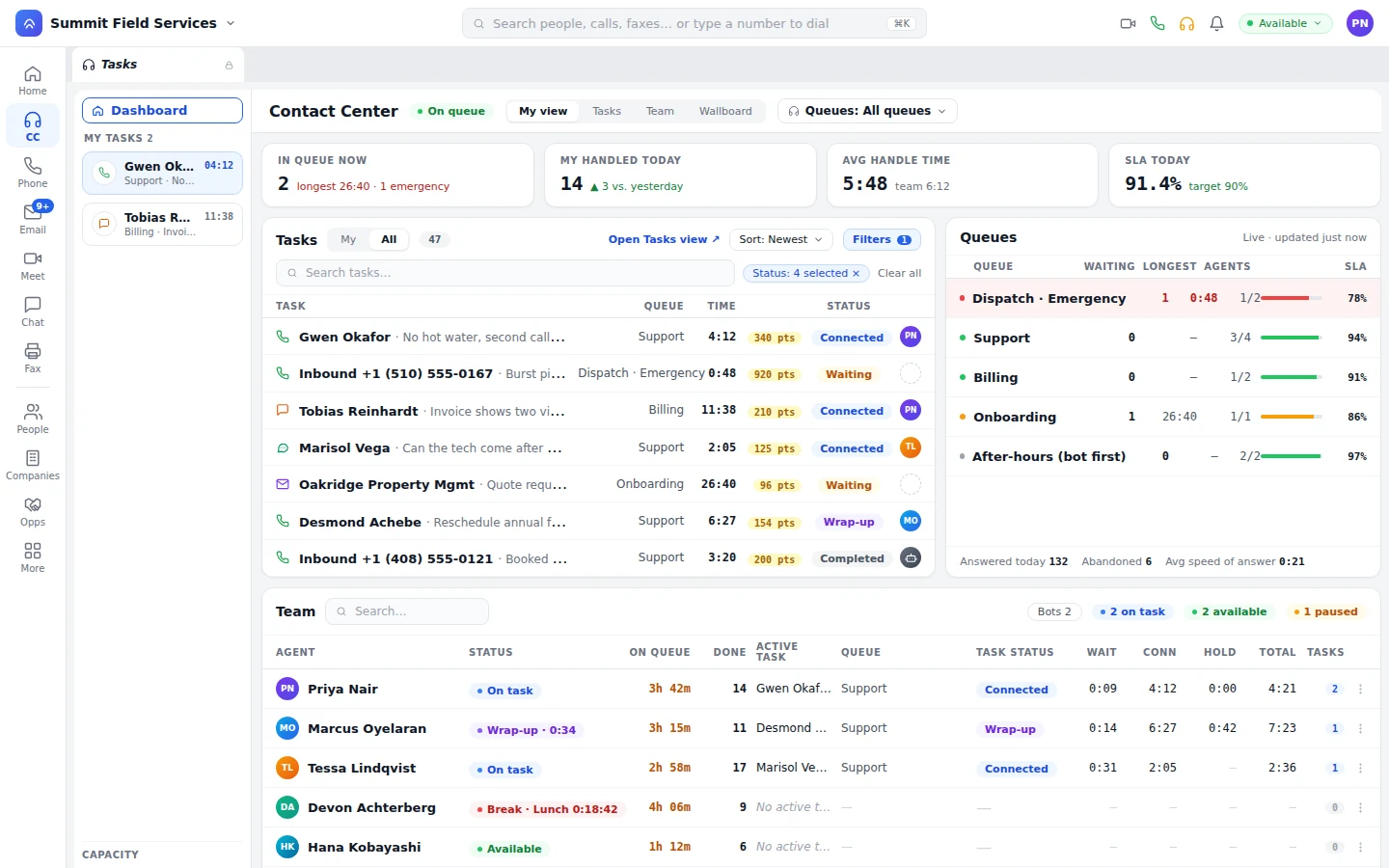
Tasks with priority points beside the live queues
An emergency call routes ahead on priority points. Every queue shows waiting, longest wait, and agents, and the after-hours queue has a bot answer before a person does.
Skills

Match the work to the person who knows it, by how well they know it.

Rank each skill Expert, Proficient, or Learning. A claims question looks for an expert first, and as the wait grows, eligibility widens to whoever's next most qualified instead of leaving the caller stuck.

Priority

Urgent work moves up.

A workflow adds points for a VIP or a repeat caller, so their task moves ahead.

Capacity and offers

Offers go to people with room, and a queue never piles up past its cap.

Agents accept or pass on each offer, and a full queue sends the rest to another queue, a workflow, voicemail, or a ring group instead of stacking endlessly.

Callbacks

Callbacks instead of hold.

A caller who picks a callback keeps their place, and the call dials when an agent accepts it.

Agent assist and coaching

Coaching and scoring happen during the conversation.

The agent has the playbook beside the call, AI Assist drafts a reply as the customer talks, and the scorecard's filled in before they hang up.

  • Live transcription and translation.

    Calls and video are transcribed as they happen, and agents can help customers in other languages on any channel.

  • Replies drafted from your knowledge base.

    The agent checks the source article, then inserts. It never sends on its own.

  • Your rubric, scored live.

    A manager who disagrees with a score changes it on the task, with the transcript and recording right there.

Playbook checklist, script step, and upcoming steps beside a live task
Playbook goals check off live, next to the script step for this moment and the steps still to come.
Call control

Calls move the way your team does, not the way an old phone system does.

Before

  • A call on hold is stuck with whoever answered it.
  • "Transfer" means hang up and hope, with no record of who tried.
  • One shared line still means one phone can use it.

On Unbound

  • Park a call in a numbered slot. Anyone with visibility picks it up from a desk phone, the web phone, or a feature code.
  • Ring groups ring everyone at once or hunt in order, confirm an outside number with a press-1, and fall back to a final destination if nobody answers.
  • A line group puts one shared line on every phone it's mapped to, so the whole team sees it and can join, separate from a parked call.
  • Transfer a warm call with an announce to the next person first, or send it straight over, from a device or by software and the API.

Front-desk staff get their own Operator panel to drag a call onto a tile and transfer it with one click.

Managers

See each queue live. Step in before service level slips.

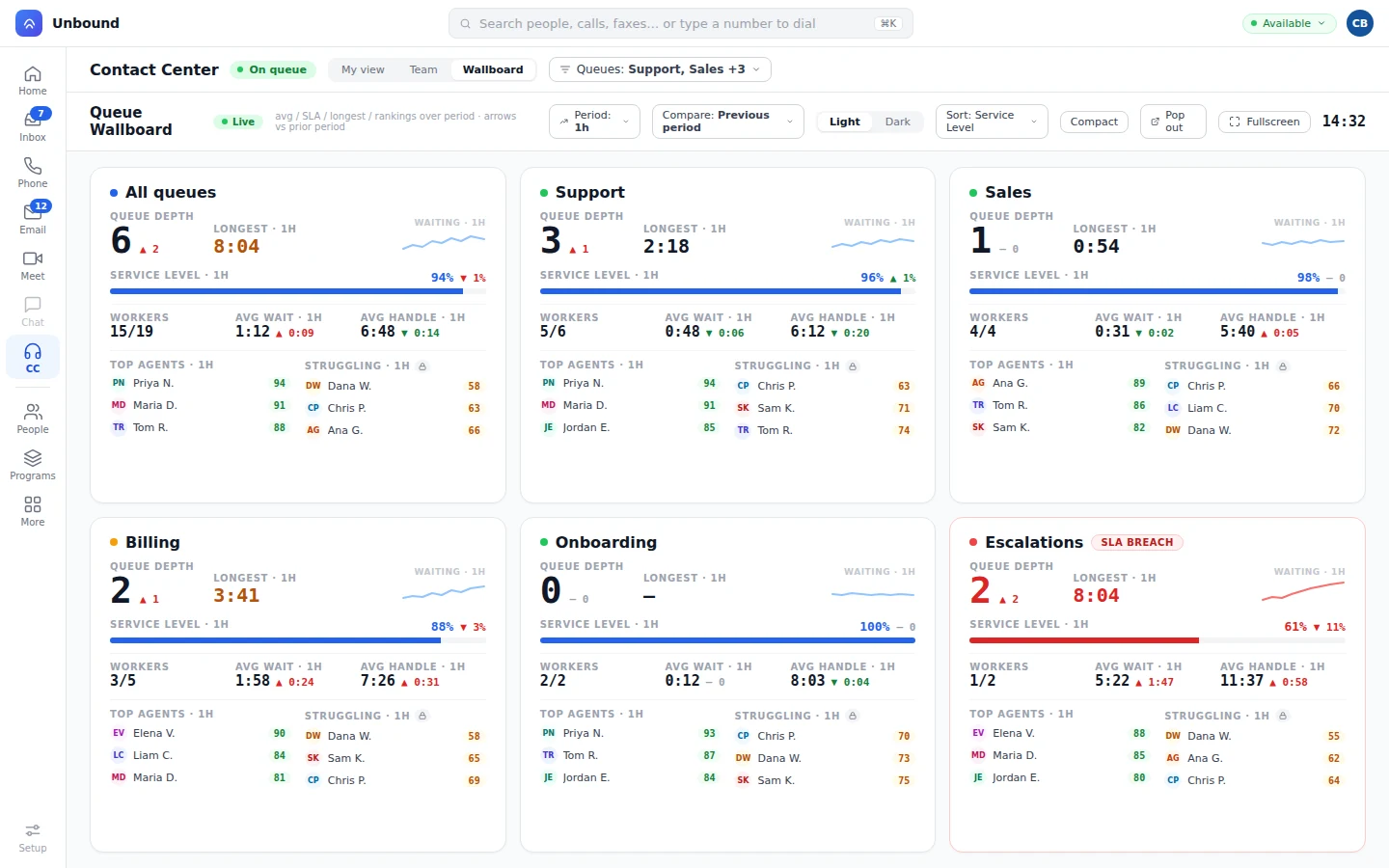
The board updates as work moves, queue by queue and agent by agent. Bots show up on the board too, and managers score them on the playbook rubric.

Queue wallboard with depth, service level, and top and struggling agents
Queue depth and longest wait update live against the prior period's service level, with top and struggling agents named.
  • Wallboards.

    Pop a view out to its own window: depth, wait, service level, and handle time against last period.

  • Proactive alerts.

    A nudge goes out before or after a break runs long, and a manager hears about a long wait, no agents on queue, or an overflow the moment it happens, on the floor or on the road.

  • Supervise.

    Join a live call to listen silently, whisper coaching only the agent hears, or barge in and take it over.

  • Reports.

    Run the standard reports, or write a UOQL query (it's SQL-style) in the visual builder or by hand.

Every device

Take the queue on Mac, Windows, iPhone, Android, or a desk phone.

The Mac, Windows, iPhone, and Android apps carry the full contact center. Agents work from the office, from home, or on the road, and anyone who wants a handset gets a SIP desk phone on the same system.

  • Agents

    Go on queue, take tasks, and wrap up from a laptop, a phone, or a desk phone.

  • Managers

    Queues, team view, and wallboard in your pocket, with every agent one tap away.

  • On the move

    A call on the mobile or web app survives a switch from Wi-Fi to cellular, and a missed voicemail arrives by email with the recording and a transcript attached.

  • Outbound lines

    Outbound calls detect a machine pickup automatically, and a voicemail drop leaves your message the moment it does, instead of waiting through the greeting.

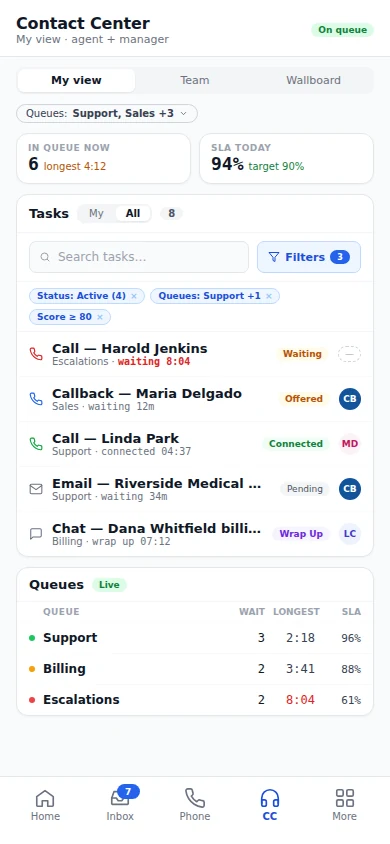
Contact center on a phone: on queue, service level, and tasks
Going on queue works right from the phone, with queue and service level live and every task showing its status.
Questions

What contact center buyers ask before they switch.

Do you have workforce management?

Part of it's built in: break tracking, live agent states (on task, wrap-up, break, available, off queue), the wallboard and team view, and standard reports with the query builder. For forecasting and scheduling, ask us.

Which channels does the TaskRouter route?

Voice, video, chat, SMS, email, fax, and tasks. Callbacks route as tasks too, by the same skills, priority points, and capacity rules.

How are conversations scored?

Against the playbook you publish. Each goal is scored as the conversation happens, and a manager can review any score and change it.

Can a supervisor join a live conversation?

Yes. An agent can invite a supervisor or specialist by name, by skill, or whoever's free, and a manager can silently listen, whisper coaching to the agent, or barge in and take the call.

Can I park a call and pick it up on a desk phone?

Yes. Park it in a numbered slot from any device, and anyone with visibility on that slot can pick it up from a desk phone, the web phone, or a feature code.
Take a call, add a text, watch the board move.

Start a 30-day trial with sample data already loaded. Go on queue, take a call, text the caller, and watch the wallboard update. Then set it up for your own queues.

With your consent, we use cookies for analytics, personalization, and advertising. Read our privacy policy for details.