Automate each call, journey, and queue on one canvas.
The people who own your IVR, marketing journeys, pre-queue steps, and team alerts build them in one designer. MCP, a standard way for AI tools and systems to call each other, connects those workflows to the systems you already run, and lets those systems call back.
100+ countries · Cloud, hybrid, or onsite · 1 to 1,000 seats
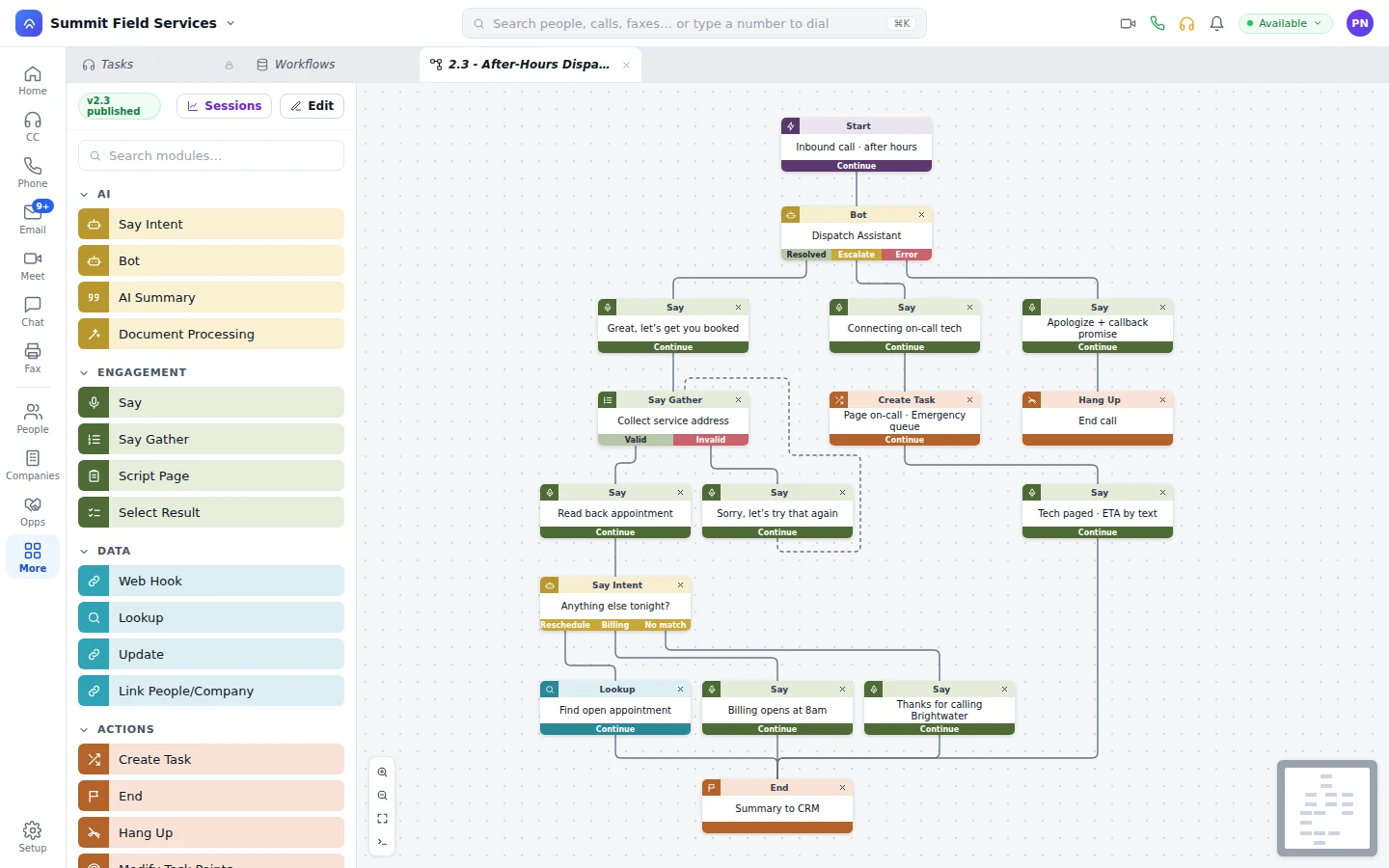
IVR, journeys, queue steps, and team alerts in one designer.
Drag steps onto the canvas from a searchable palette. Every step has typed exits, and there's zoom, a minimap, and a console when you need them.
- IVR
Greet, gather, detect intent, look up the caller, and transfer.
- Journeys
Enroll, wait, text, email, call, and move ad audiences.
- Queue steps
Create the task, set skills and priority points, and route it.
- Alerts
Ping the team by chat, text, or email when something needs a human.
Thirty-plus modules, grouped the way you think.
Whatever step you're reaching for is probably already there.
AI.
Bot, Say Intent, AI Summary, and Document Processing.
Engagement.
Say, Say Gather, Script Page, and Select Result.
Data.
Web Hook, Lookup, Update, and Link People/Company, reading and writing CRM records with no connector.
Actions and routing.
Create Task, Create Call, Send SMS, Send Email, Send Fax, Transfer, Wait, the ad steps, Enroll in Program, Post Feed, A/B Routing, Logic, and Time Control.
Bring outside tools in. Let other systems call your workflows.
MCP runs through workflows. Your IT team or ours connects the outside system once, say your scheduling or billing tool, and from then on its tools are steps your workflow builders drag in without writing code.
- Bring tools in.
Pull customer details from another system, or confirm an appointment in it.
- Publish your own.
Build a workflow once and expose it as an MCP tool, for Unbound or for any platform or AI agent that speaks MCP.
- Use them on live work.
Agents and bots reach for them mid-task to look something up, confirm a detail, or take the payment.
- Ask from chat or a call.
Your staff can fire one off from team chat or halfway through a phone call.
Operations builds it. Developers extend it.
Whoever runs the phones, the queues, or the campaigns changes their own workflows. When something needs code, your developers write normal JavaScript, not a proprietary language.
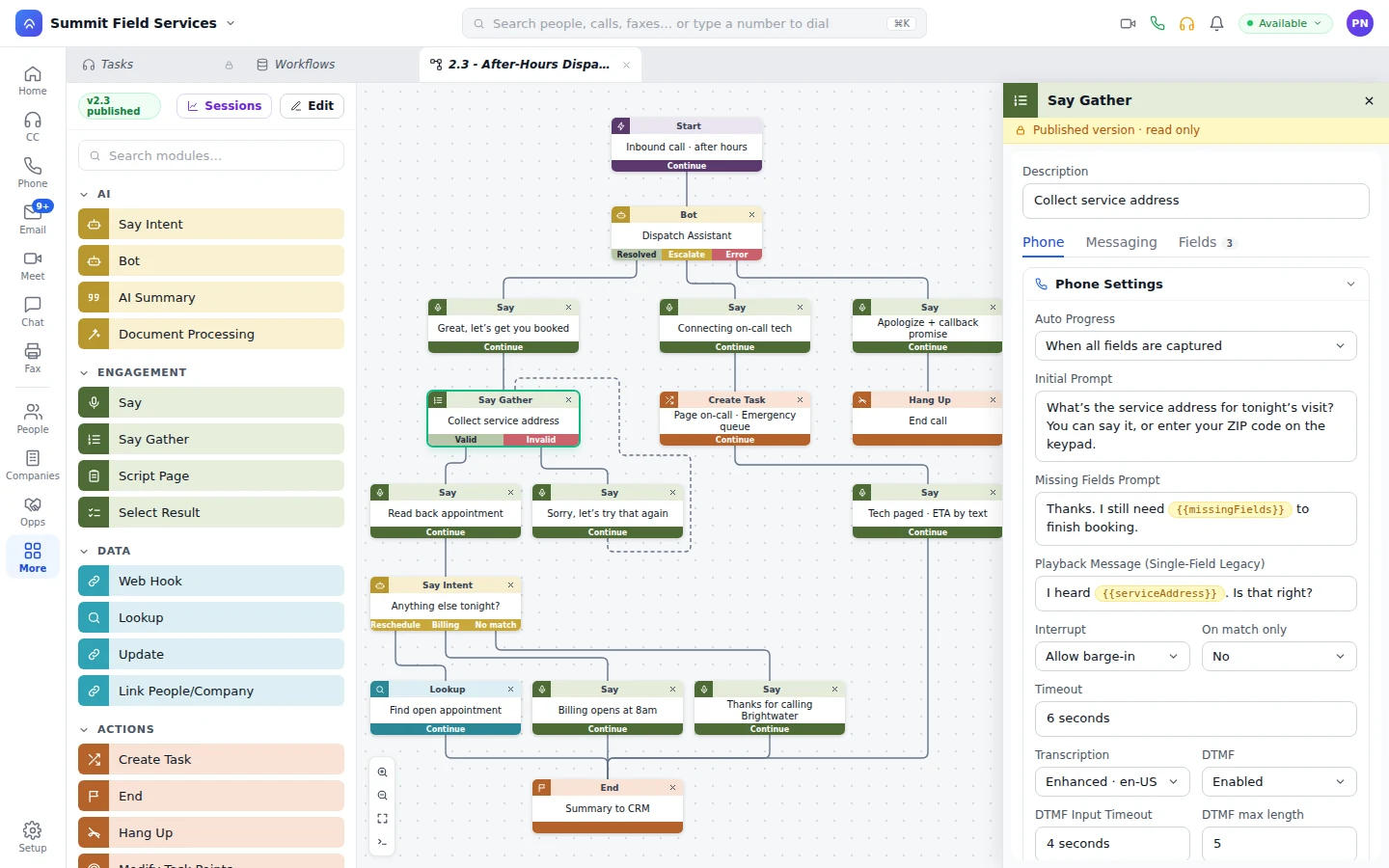
Module settings.
Open a step and its prompts, fields, timeouts, and input rules are in a side panel.
Versions and Sessions.
Name a version, publish it, and replay any run step by step.
Triggers.
Record changes, score thresholds, form submissions, and webhooks start workflows.
Drop in a Bot step and it answers the call or chat, looks things up and books with the connected tools, and exits Resolved or Escalate. When it escalates, a person picks up the task with everything the bot learned. More on bots
What ops teams ask about workflows.
What is MCP?
Model Context Protocol, an open standard that lets AI tools and business systems call each other. On Unbound it runs through workflows, and it works both ways.
Who builds workflows and MCP connections?
Your operations and marketing people build and change workflows themselves, no code needed. Hooking up a new outside system is a job for your IT team or ours; after that, its tools sit on the palette like any other step.
Can other platforms call our workflows?
Yes. Publish a workflow as an MCP tool and anything that speaks MCP, a platform or an AI agent, can call it.
Can agents use MCP tools on live tasks?
Yes. Your agents and bots use them on live tasks to pull up information, confirm an appointment, or take payment through the payment step.
Change a live workflow in your first hour.
Your account opens with sample data loaded and IVR, journeys, and bots already on the canvas. Edit a step, publish it, then talk to us about hooking up your own systems.